Unlock Documents that have a Password: A Free, Open-Source Tool to Decrypt Word, Excel, PowerPoint and PDF Documents Locally
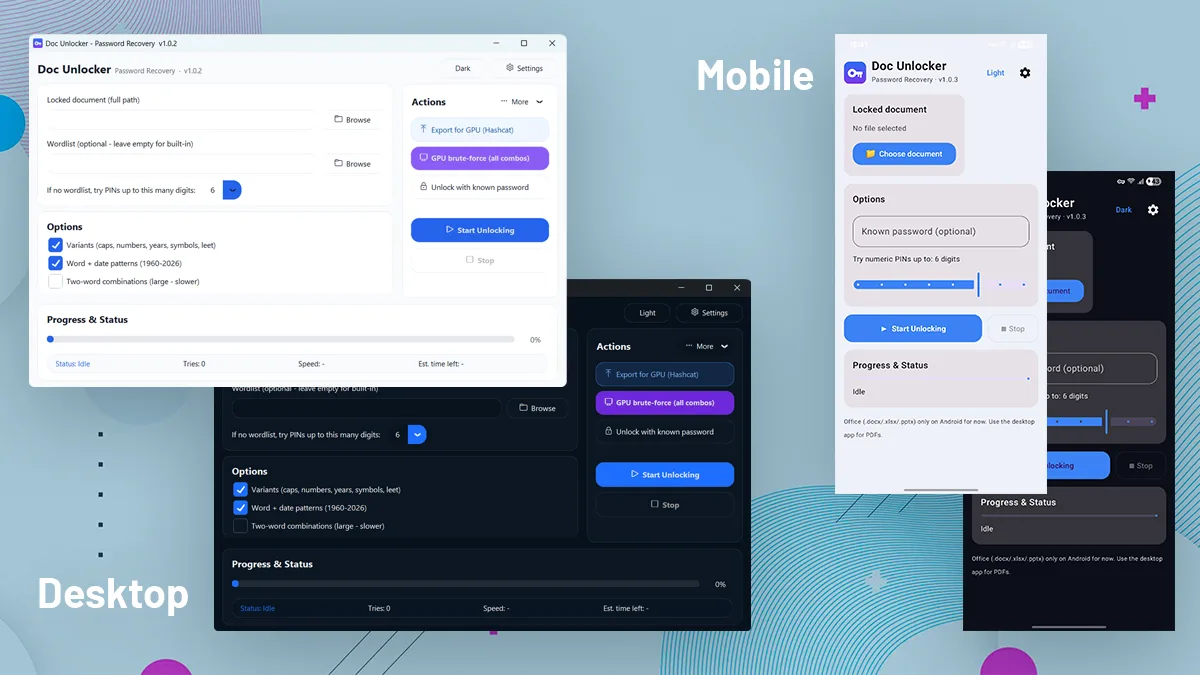
Doc Unlocker is a free, portable (no need to install), open-source desktop app that helps you recover the password of a Microsoft Office or PDF document you own — with a friendly GUI, smart guessing, and optional GPU acceleration.
Use it responsibly. Doc Unlocker is a password-recovery tool for documents you own or are explicitly authorised to access — for example, a file whose password you forgot. Do not use it on documents you have no right to open.
What it does
You point it at a password-protected document and it works to produce an unlocked copy (Unlocked_<yourfile>).
Supported files: Microsoft Word (.docx, .docm, .doc), Excel (.xlsx, .xlsm, .xls), PowerPoint (.pptx, .pptm, .ppt) and PDF (.pdf).
A. Smart CPU guessing
B. GPU acceleration (via Hashcat)
For modern Office encryption (AES-256 / SHA-512 / 100,000 iterations, Hashcat mode -m 9600), the CPU is slow by design. Doc Unlocker can hand the work to your GPU:
GPU acceleration currently targets Office files only. PDFs use the CPU path; PDF GPU modes are planned.
C. Quality-of-life Settings
Installation
Option A — Download the ready-made build (easiest)
1 - Go to the latest release:
2 - Download the appropriate version for your Operating System:
Option B — Run from source (Windows)
git clone https://github.com/Fallax-Vision/doc_unlocker.git
cd doc_unlocker
py -m pip install -r requirements.txt
py doc_unlocker.py
On first launch, the app offers to install its small dependencies (msoffcrypto-tool, olefile, pypdf, customtkinter) automatically.
How it works (under the hood)
- Doc Unlocker helps you recover access to password-protected documents by testing possible passwords in an automated way. Instead of manually trying different combinations one by one, the app prepares password candidates, checks them against the selected file, and unlocks the document when the correct password is found.
- For Microsoft Office files, the app reads the document’s encryption information and can generate a recovery hash that works with Hashcat. This makes it possible to use GPU acceleration for supported Office documents, which can be much faster than using the CPU alone.
- For PDF files, the app tests each password candidate directly against the protected PDF and verifies whether the password can successfully open and decrypt the file.
- Doc Unlocker can generate password guesses from user-provided words, common patterns, numbers, dates, symbols, capitalization changes, and simple variations. This helps improve the chances of recovering passwords based on familiar words, names, years, or personal habits.
- When the correct password is found, the app decrypts the document and creates a new unlocked copy. The original protected file is not overwritten, so you keep both the original file and the unlocked version.
- Under the hood, Doc Unlocker uses trusted open-source tools such as msoffcrypto-tool for Microsoft Office documents, pypdf for PDF files, and Hashcat for optional GPU-powered password recovery.
Doc Unlocker is intended only for documents you own or are clearly authorized to access.
Contributing — help wanted
This is a community project, and contributions are very welcome. We especially need help building macOS and Linux versions. Good first issues: app screenshots, more wordlists, translations, and CI improvements.
License
Released under the MIT License — free to use, modify, redistribute, and even commercialise. Made by Fallax Vision and contributors.

Comments 0
Be the first to comment.